© 1999 Gary S. Stager
LCSI recently released an exciting new multimedia, simulation and interactive web-authoring package, MicroWorlds Pro.
MicroWorlds Pro (Win 95/98) is the first major revision of the award-winning MicroWorlds software since 1993. While it is a completely new software package, all of your existing MicroWorlds projects will run in MicroWorlds Pro.
While MicroWorlds Pro was developed to support the learning of secondary school students through the addition of new programming features and more advanced project ideas, it is an excellent tool for learners of all ages. A principle of Logo has always been that it has no threshold and no ceiling. MicroWorlds Pro is no exception.
The following are a few reasons why MicroWorlds Pro may be the Logo you’ve been waiting for.
New and Improved Interface
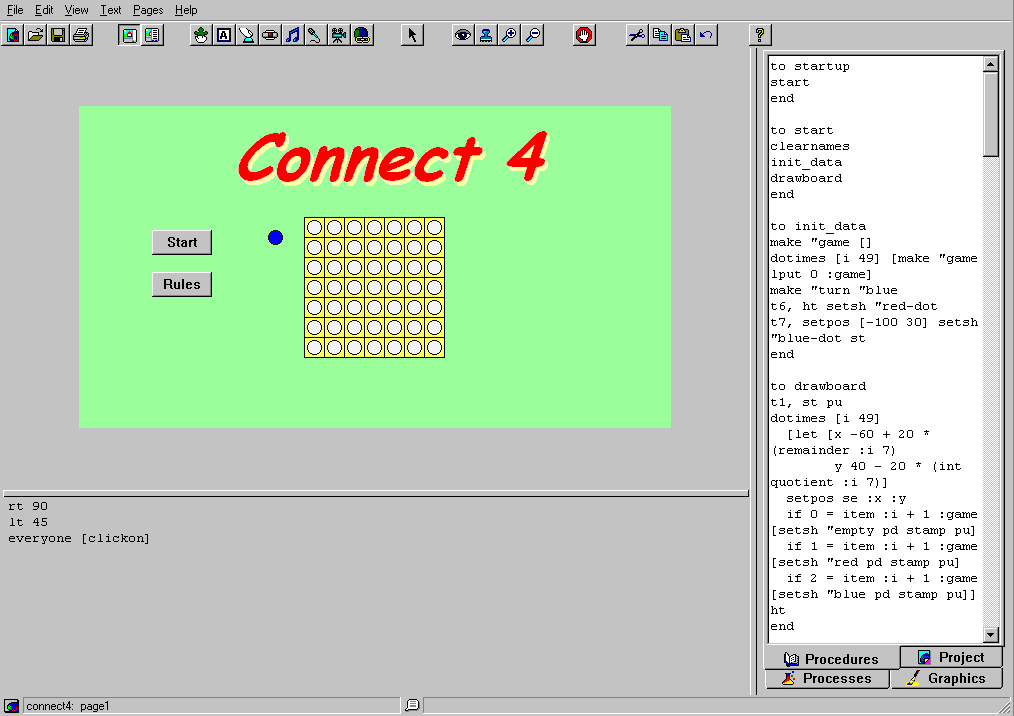
All of the multimedia object tools available in MicroWorlds are available in MicroWorlds Pro. MicroWorlds Pro has sports a greatly improved WYSIWYG interface in which beautiful projects may be created and debugging is a breeze.
There are four tabs in MicroWorlds Pro: procedures, processes, graphics and objects. These tabs sit alongside your project, unless you hide them.
Procedures reside in a tab (window) right along-side of your page. This way you can affect cause and effect without flipping the page.
The processes tab lists all of the processes currently running so you can keep track of what’s happening "behind the scenes." The ability to choose a normal, slow and slower speed at which your project runs makes debugging more clear.
The objects tab shows a list of every page in your project and every object on that page. Right-click on one of those objects and you can edit it.
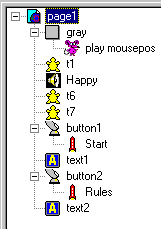
The graphics tab contains your turtle costumes and painting tools in one area. Shapes and graphic tools are no longer kept in separate areas.
Right-click on any object or even the page background and you can edit that object!
Better Graphics
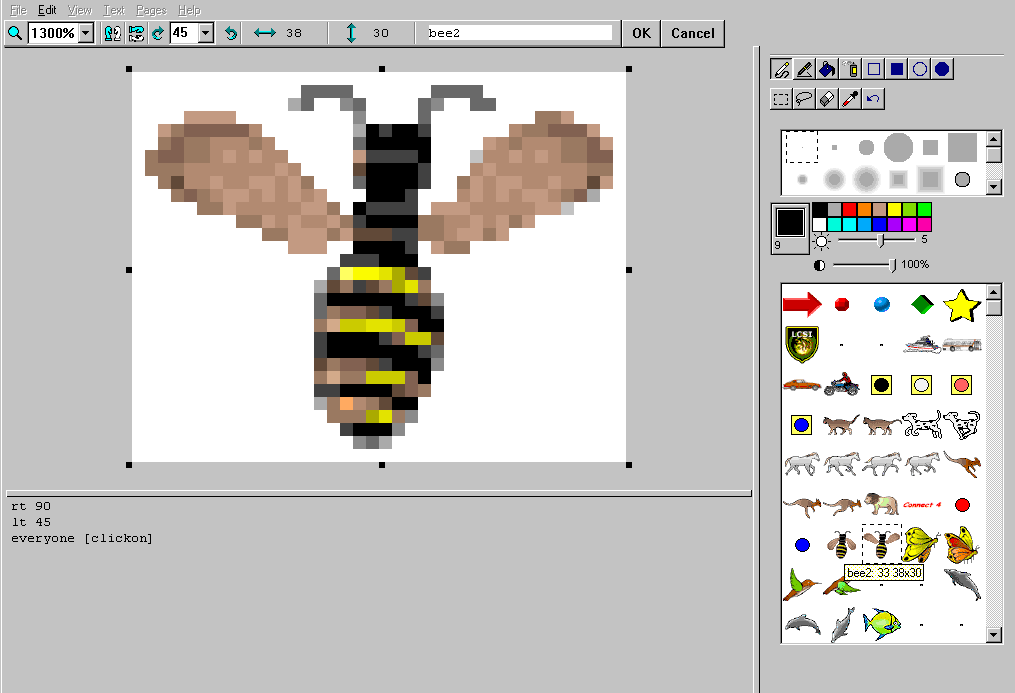
MicroWorlds Pro has room for a lot more turtle costumes and all sorts of new paint brushes. The shapes editor allows you to rotate a costume by any number of degrees. You can even magnify the drawing area in the shapes editor.
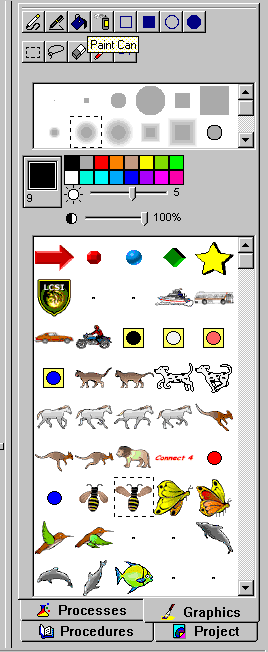
Perhaps the coolest thing about the new graphics tab is that if you select a shape and click on a turtle, that turtle will wear that costume. If you click on a shape and then click on the page, that graphic will be automatically stamped on the page. You can resize the image before it becomes a permanent part of the page background.
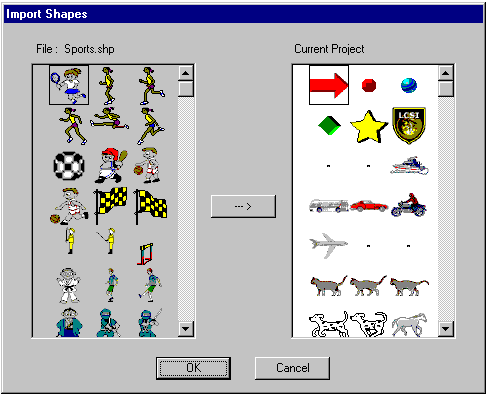
MicroWorlds Pro makes it easy to import shapes from other projects. Choose Import-Shapes from the File menu and a graphical interface pops-up allowing you to select a shape from one file and choose where it will be stored in the current shapes list.
In MicroWorlds you can now rotate a shape by a specific number of degrees. This makes it easier to create turtle costumes that will turn under program control.
Little kids and impatient "hard" programmers can animate a turtle by shift-clicking through a variety of turtle costumes. Right click-Animate to make the turtle go.
Instant Web Publishing
With the click of the mouse MicroWorlds Pro automatically exports your project for play via the web plug-in AND creates the HTML file necessary for playing that project on the Internet or Intranet. This HTML file may be opened in a web authoring program if additions to the page are desired.
No other program offers P-12 students such powerful opportunities for publishing interactive work on the web! Web-based projects no longer need to be static.
MicroWorlds Pro Talks with Excel
MicroWorlds Pro can write data to an Excel spreadsheet for further manipulation and graphing. It can also read data from an Excel spreadsheet opening up all sorts of simulation possibilities based on real data. Future issues of Logo Exchange will explore these exciting capabilities.
MicroWorlds Pro Can Spell
Right click on a text box and MicroWorlds Pro uses the Microsoft Word dictionary to check your spelling.
New Sophisticated Programming Functionality
A variety of new data structures and primitives are part of MicroWorlds Pro. Many more processes may run in parallel as well.
Your Pages Scroll
If you can justify doing so, MicroWorlds Pro allows you to create pages larger than your viewing area. Since your pages scroll, don’t be surprised when your turtles disappear temporarily. MicroWorlds Pro offers a variety of preset project sizes from the File-New Project Size menu. Keep your projects small if you plan on web publishing.
Online Interactive Help
The MicroWorlds Help system is built in HTML and features interactive examples of how primitives and programming concepts might be used.
New Documentation
MicroWorlds Pro comes with two terrific new books, Learning with MicroWorlds Pro by Logo Exchange founder, Tom Lough and MicroWorlds Pro Tips and Tricks. The Tips and Tricks book explains a few dozen MicroWorlds skills and concepts through short clear examples. Tom Lough’s tutorial contains a variety of project ideas geared towards secondary and post-secondary users. The projects include presentations, games and genetic simulations.
It’s Great for Little Kids
Don’t let the documentation and marketing scare you. The improved more concrete user-interface and graphic tools makes MicroWorlds Pro an outstanding tool for even the youngest children. For example: you can hatch a turtle, put a shape on the turtle and from the contextual menu choose animate. Voila! Your turtle is now animated!
I can hear what some of you are thinking. Where’s the thinking? The answer is two-fold.
Shift-click a series of shapes and then the turtle and that turtle will use flipbook animation.
All of your old Logo activities will work just fine, probably even enhanced, in MicroWorlds Pro.
Give MicroWorlds Pro a try. Share your experiences and innovations with us and we’ll feature them in future issues of Logo Exchange!